
Visual routine charts for kids who can’t read yet
A visual routine chart uses a recognizable picture for each step, so your child can see what comes next before they can read the words. Start with one short routine, teach the pictures together, and give them a simple way to mark each step finished, whether you use paper cards or an app such as Chorby.
Updated
Start with one routine you already repeat
Think about the instructions you give every evening: pajamas, clothes in the hamper, brush teeth. Those familiar steps are a useful starting point. Leave the full weekly chore schedule for later.
Try three steps first. This is a manageable starting example, not a rule about how much a child should do. Include jobs they have practiced, and stay beside them for anything they still need help doing. A chart can carry the reminder; it cannot teach every skill by itself.
Choose pictures your child understands
Before adding a picture, show it to your child and ask, “What does this remind you to do?” A toothbrush may make sense immediately. A sparkling star might mean almost anything.
- Use one clear action per picture. “Clothes in hamper” is easier to show than “Get ready.”
- For a paper chart, try a photo of their own hamper or shoes if a drawing is confusing.
- Keep a short label beside the picture so adults and older siblings use the same words.
- Use color as an extra cue, with the picture and label doing the explaining.
Keep familiar pictures once your child understands them. If you change an image, explain the new one together before the busy part of the day.
Two small routines to borrow
These are starting examples to adapt to your family, not complete care routines or age-based requirements.
Morning
- Get dressed.
Picture: shirt and trousers. - Brush teeth with help.
Picture: toothbrush. - Put shoes on.
Picture: their shoes.
Bedtime
- Put pajamas on.
Picture: pajamas. - Put clothes in the hamper.
Picture: laundry basket. - Brush teeth with help.
Picture: toothbrush.
Put the steps in the order they happen in your home. Keep the chart where your child can actually use it, and return to it between jobs. A list hidden on a parent’s phone is harder to follow than one you open together or leave on a shared family tablet.
Practice using the chart together
- Look. Point to the first picture and name the action.
- Do. Help with the task as much as your child needs.
- Mark it finished. Turn over a card, move it to a “done” space, or check it off in the app.
- Find the next step. Look back at the chart together.
As the sequence becomes familiar, try “What’s next on your chart?” instead of listing every instruction again. If they are stuck, help with that step. Needing a reminder to check the chart does not mean it has failed.
Paper chart or routine app?
Paper is a good starting point if you want one small routine without a screen. Draw the steps or use photos, and let your child move or turn over the cards. You do not need to buy an app to try the idea.
An app becomes useful when you want repeating tasks, separate lists for siblings, or one shared plan that parents can update. Check whether the task pictures make sense to your child, finished work is easy to recognize, and everyone can reach the list when they need it. Those details matter more than having lots of features.
How a picture routine works in Chorby
In Chorby, you name each task, choose its icon and color, and assign it to the family member who will do it. Scheduled tasks can repeat on the days you choose. Each person can follow an Adventure Map or a simple task list.
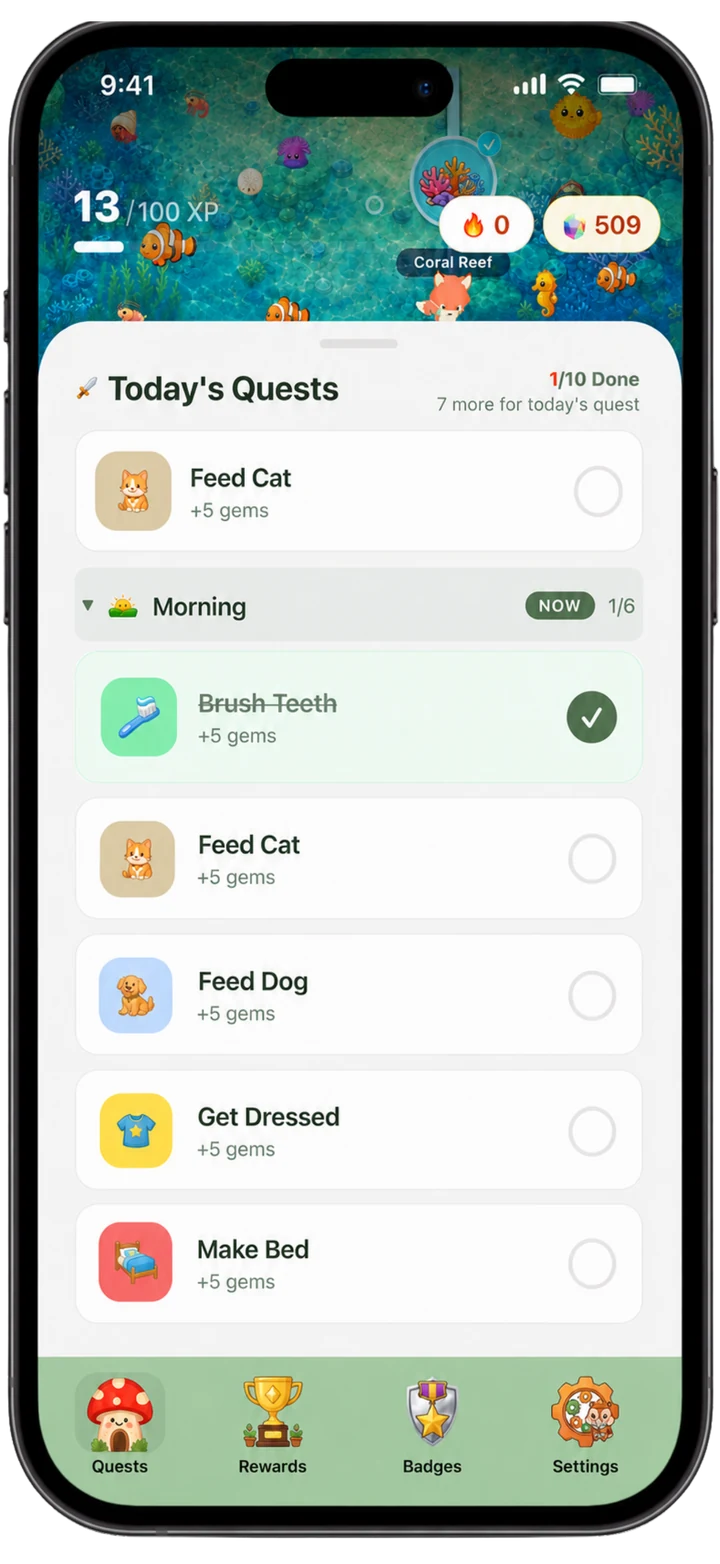
Younger and older siblings can have different responsibilities. For example, one child might put clothes in the hamper while another puts clean laundry away. A shared Family Hub on an iPad or Android tablet means every child does not need their own phone.
Rewards are optional. Choose Gems, Cash, or an optional allowance, or track tasks without rewards. If you use Gems, choose rewards together so your child understands what they are working toward. Parent access requires a subscription or trial; see the setup FAQ for details.
If your child stops using the chart
- The picture is unclear: ask what they think it means and choose a clearer one together.
- The job is too big: replace “Tidy room” with one concrete action, such as “Books on shelf.”
- The list feels long: keep just the routine you are practicing for now.
- They check things off early: show what finished looks like and check together.
- They need help: keep helping. Pictures show the plan; they do not replace an adult.
Notice a specific effort, such as putting the clothes away or coming back to check the next picture. There is no fixed number of days after which a child should follow a routine independently, and no chart guarantees an end to difficult mornings.
Common questions
Do we have to wait until they can read?
No. The point is to use pictures they recognize. Check their understanding of each one and practice the actual task together.
Can siblings share one chart?
They can share a place to check their routines, but make it clear whose tasks are whose. Separate rows on paper or individual lists in Chorby let you adjust the jobs without giving everyone the same expectations.
Give tonight’s routine a place to live
Pick three familiar steps, choose the pictures with your child, and walk through them together. If you want repeating lists, adventure maps, and one shared family plan, explore Chorby on iPhone, iPad, or Android, with Apple Watch support.


Further reading on visual routines
For picture cards and guidance on showing a routine, see the National Center for Pyramid Model Innovations’ home routine cards (PDF) and Head Start’s visual schedule guide (PDF). These are general educational resources, not endorsements of Chorby.